Network Security Policies for Cluster-Level Access

Introduction
You've applied a default-deny NetworkPolicy. Traffic stops flowing. Pods can't resolve DNS. Prometheus scraping fails. cert-manager can't reach the API server to issue certificates.
This is where most network policy guides stop. They show you podSelector: {} with policyTypes: [Ingress] and call it done. Production is not done. Production has CoreDNS in kube-system, metrics endpoints on node ports, and certificate controllers that need egress to ACME servers.
Network Policies are the CKS exam's first line of cluster-level access control. They operate at layer 3/4. They require a CNI plugin that actually enforces them. They fail silently when misconfigured. This lesson covers default-deny baselines, the DNS and system-component exceptions every namespace needs, cross-namespace isolation patterns, and the selector semantics that catch most people in production.
Default-Deny Baselines
Every network security posture starts with zero trust. Deny everything, then allow explicitly. This gives you a known baseline where unauthorized traffic cannot slip through.
Deny All Ingress
The simplest isolation policy. An empty podSelector matches every pod in the namespace. Listing only Ingress in policyTypes blocks all inbound connections while leaving egress untouched.
# default-deny-ingress.yaml
apiVersion: networking.k8s.io/v1
kind: NetworkPolicy
metadata:
  name: default-deny-ingress
  namespace: production
spec:
  podSelector: {}
  policyTypes:
  - Ingress
This is the default deny ingress pattern from the official docs. Pods still initiate outbound connections freely, but nothing reaches them unless another policy explicitly allows it.
Deny All Egress
Blocking egress has the most disruptive side effect. This stops pods from initiating any outbound connection, including DNS resolution.
# default-deny-egress.yaml
apiVersion: networking.k8s.io/v1
kind: NetworkPolicy
metadata:
  name: default-deny-egress
  namespace: production
spec:
  podSelector: {}
  policyTypes:
  - Egress
Apply this and your pods can't resolve service names. The kubernetes-network-policy-recipes project demonstrates the failure mode clearly:
$ kubectl run --rm -i -t --image=alpine --labels="app=foo" test -- ash
/ # wget -qO- --timeout 1 http://web:80/
wget: bad address 'web:80'
The pod fails at DNS resolution, not at connection establishment. This is the most common surprise with egress deny policies.
Deny All Traffic
The most restrictive baseline. Blocks both directions. You must explicitly allow every traffic flow, including DNS.
# default-deny-all.yaml
apiVersion: networking.k8s.io/v1
kind: NetworkPolicy
metadata:
  name: default-deny-all
  namespace: production
spec:
  podSelector: {}
  policyTypes:
  - Ingress
  - Egress
Use this for sensitive namespaces: database clusters, payment processing, secrets management. Every allowed flow becomes an explicit, auditable decision.
tip: Apply default-deny to every namespace except
kube-system. Then build allow rules per workload. This creates a dependency graph between components that you can reason about and audit.
Allowing Required Traffic
Default deny blocks everything. The next step is building explicit allow rules for legitimate traffic flows.
Allow DNS Resolution
This is the first rule you need after default-deny egress. Without it, nothing works. CoreDNS serves DNS on port 53 (UDP and TCP) from the kube-system namespace.
Use the kubernetes.io/metadata.name label to target kube-system by name. This is an immutable label the control plane sets automatically on every namespace, so you don't need to manage custom labels.
# allow-dns.yaml
apiVersion: networking.k8s.io/v1
kind: NetworkPolicy
metadata:
  name: allow-dns
  namespace: production
spec:
  podSelector: {}
  policyTypes:
  - Egress
  egress:
  - to:
    - namespaceSelector:
        matchLabels:
          kubernetes.io/metadata.name: kube-system
      podSelector:
        matchLabels:
          k8s-app: kube-dns
    ports:
    - protocol: UDP
      port: 53
    - protocol: TCP
      port: 53
Two things to note. First, both namespaceSelector and podSelector are under the same list item (no - before podSelector). This means AND: only pods labeled k8s-app: kube-dns in the kube-system namespace. If you added a - before podSelector, it would mean OR: any pod labeled k8s-app: kube-dns in the local namespace, or any pod in kube-system. That distinction is a CKS exam topic.
Second, include both UDP and TCP. DNS uses UDP by default but falls back to TCP for responses exceeding 512 bytes (or when EDNS0 is not supported).
Verify the policy is interpreted correctly after applying:
$ kubectl describe networkpolicy allow-dns -n production
Name:         allow-dns
Namespace:    production
Spec:
  PodSelector:     <none> (Coverage: all pods in the namespace)
  Allowing egress traffic:
    To Port: 53/UDP
    To Port: 53/TCP
    To:
      NamespaceSelector: kubernetes.io/metadata.name=kube-system
      PodSelector: k8s-app=kube-dns
  Policy Types: Egress
The output confirms both selectors are AND-ed (shown on the same To: line) and both ports are allowed. Run kubectl describe networkpolicy after every policy change. On the CKS exam, this is how you verify your work.
Allow Ingress from Specific Pods
Restrict incoming connections to pods with matching labels. Only the frontend reaches the database.
# allow-frontend-to-db.yaml
apiVersion: networking.k8s.io/v1
kind: NetworkPolicy
metadata:
  name: allow-frontend-to-db
  namespace: production
spec:
  podSelector:
    matchLabels:
      app: database
  policyTypes:
  - Ingress
  ingress:
  - from:
    - podSelector:
        matchLabels:
          app: frontend
    ports:
    - protocol: TCP
      port: 5432
This allows TCP port 5432 only from pods labeled app: frontend in the same namespace. Combined with the default-deny policy, all other ingress is blocked. The from array and ports array within the same rule are AND conditions: the traffic must match both a source selector and a port.
Allow Egress for System Components
System components break silently under default-deny egress. The cert-manager CertificateRequest controller needs three things: DNS resolution, API server access, and egress to external ACME endpoints for certificate issuance. Without an explicit egress policy, certificate renewal fails and TLS termination breaks.
# allow-cert-manager-egress.yaml
apiVersion: networking.k8s.io/v1
kind: NetworkPolicy
metadata:
  name: allow-cert-manager
  namespace: cert-manager
spec:
  podSelector:
    matchLabels:
      app.kubernetes.io/name: cert-manager
  policyTypes:
  - Egress
  egress:
  - to:
    - namespaceSelector:
        matchLabels:
          kubernetes.io/metadata.name: kube-system
      podSelector:
        matchLabels:
          k8s-app: kube-dns
    ports:
    - protocol: UDP
      port: 53
    - protocol: TCP
      port: 53
  - to:
    - ipBlock:
        cidr: 0.0.0.0/0
    ports:
    - protocol: TCP
      port: 443
The first rule allows DNS. The second allows HTTPS egress to any destination on port 443. cert-manager needs to reach the Kubernetes API server (kubernetes.default.svc:443) and external ACME endpoints (like Let's Encrypt). Using ipBlock: 0.0.0.0/0 with port 443 is broader than ideal but necessary when ACME provider IPs change. Tighten this with except blocks for your internal subnets if needed.
Namespace Isolation
Network Policies control traffic across namespace boundaries. This is essential in multi-tenant clusters where teams share infrastructure but shouldn't access each other's workloads.
Deny Traffic from Other Namespaces
The simplest namespace isolation pattern. Allow traffic only from pods in the same namespace.
# deny-from-other-namespaces.yaml (from kubernetes-network-policy-recipes)
apiVersion: networking.k8s.io/v1
kind: NetworkPolicy
metadata:
  name: deny-from-other-namespaces
  namespace: production
spec:
  podSelector: {}
  ingress:
  - from:
    - podSelector: {}
The empty podSelector: {} in the from clause matches all pods, but only within the policy's own namespace. Pods from other namespaces are blocked. This is different from namespaceSelector: {}, which matches all namespaces.
Cross-Namespace Ingress
Allow specific namespaces to reach specific pods. Target namespaces using kubernetes.io/metadata.name.
# cross-namespace-ingress.yaml
apiVersion: networking.k8s.io/v1
kind: NetworkPolicy
metadata:
  name: allow-gateway-ingress
  namespace: production
spec:
  podSelector:
    matchLabels:
      app: api
  policyTypes:
  - Ingress
  ingress:
  - from:
    - namespaceSelector:
        matchLabels:
          kubernetes.io/metadata.name: staging
    - namespaceSelector:
        matchLabels:
          kubernetes.io/metadata.name: development
    ports:
    - protocol: TCP
      port: 8080
Two separate namespaceSelector items in the from array (each preceded by -). This is OR logic: traffic from the staging namespace or the development namespace reaches app: api pods on port 8080. Other namespaces are denied.
Combined Namespace and Pod Selectors
When you need to allow traffic from a specific pod in a specific namespace, combine both selectors in a single from item (AND logic).
# combined-cross-namespace.yaml
apiVersion: networking.k8s.io/v1
kind: NetworkPolicy
metadata:
  name: allow-gateway-to-payments
  namespace: production
spec:
  podSelector:
    matchLabels:
      team: payments
  policyTypes:
  - Ingress
  - Egress
  ingress:
  - from:
    - namespaceSelector:
        matchLabels:
          kubernetes.io/metadata.name: staging
      podSelector:
        matchLabels:
          app: gateway
    ports:
    - protocol: TCP
      port: 8080
  egress:
  - to:
    - namespaceSelector:
        matchLabels:
          kubernetes.io/metadata.name: database
      podSelector:
        matchLabels:
          app: postgres
    ports:
    - protocol: TCP
      port: 5432
  - to:
    - namespaceSelector:
        matchLabels:
          kubernetes.io/metadata.name: kube-system
      podSelector:
        matchLabels:
          k8s-app: kube-dns
    ports:
    - protocol: UDP
      port: 53
    - protocol: TCP
      port: 53
The ingress rule uses AND: only app: gateway pods from the staging namespace. The egress rules allow reaching PostgreSQL in the database namespace and DNS in kube-system. Note the DNS rule: even targeted egress policies need explicit DNS access.
warning: The YAML indentation on
podSelectormatters. IfpodSelectoris a separate list item (with its own-), it matches pods in the local namespace. If it's at the same level asnamespaceSelector(no-), it's an AND condition with the namespace. Verify withkubectl describe networkpolicyafter applying.
Gotchas and Lessons Learned
Network Policies have failure modes that don't surface until production.
Policies Are Additive, Never Subtractive
Network Policies only add allow rules. You cannot create a policy that denies a specific flow if another policy allows it. The effective policy for a pod is the union of all matching policies. If one policy allows port 80 from namespace A and another allows port 443 from namespace B, the pod accepts both.
This means you can't create an "override deny" policy. Your security model depends entirely on having default-deny in place and being selective with allow rules.
CNI Plugin Must Support Enforcement
Creating a NetworkPolicy resource without a supporting CNI plugin does nothing. The API server accepts the manifest, kubectl get networkpolicy shows it exists, but traffic flows freely. Calico, Cilium, Antrea, and Kube-router enforce Network Policies. Flannel does not.
$ kubectl get pods -n kube-system -l k8s-app=calico-node
NAME                READY   STATUS    RESTARTS   AGE
calico-node-7x2kf   1/1     Running   0          12d
calico-node-m9p4r   1/1     Running   0          12d
Verify your CNI before relying on Network Policies for security. On the CKS exam, check what CNI is running before writing policies.
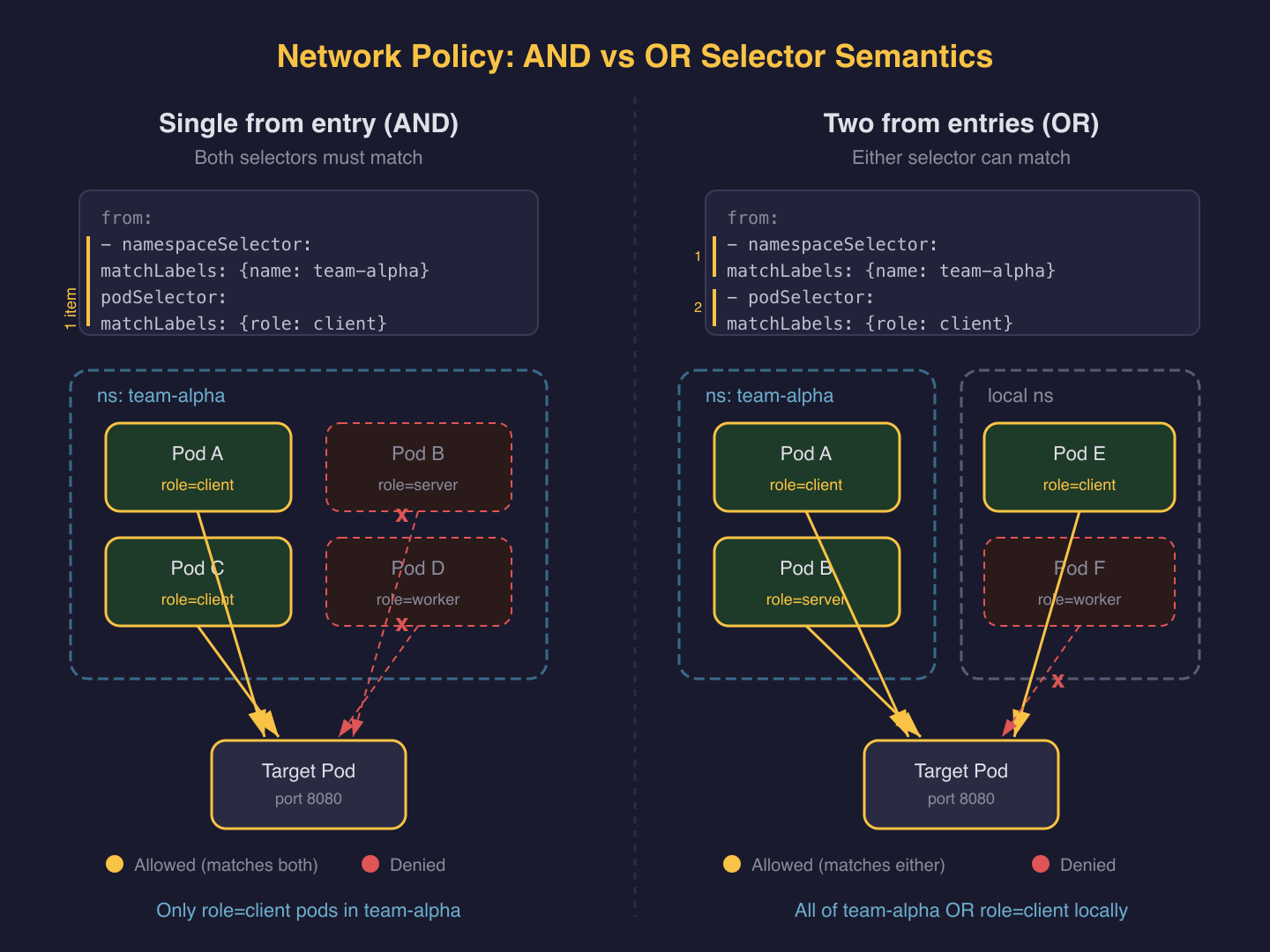
The AND vs OR Selector Trap
This is the most common Network Policy mistake and a frequent CKS exam question. Two selectors in a single from/to item are AND. Two separate items are OR.
# AND: pods labeled role=client IN namespaces labeled user=alice
ingress:
- from:
  - namespaceSelector:
      matchLabels:
        user: alice
    podSelector:
      matchLabels:
        role: client
# OR: pods labeled role=client in local namespace, OR any pod in namespaces labeled user=alice
ingress:
- from:
  - namespaceSelector:
      matchLabels:
        user: alice
  - podSelector:
      matchLabels:
        role: client
The difference is a single - character. The OR version is far more permissive: it allows all pods in user=alice namespaces regardless of their labels.
Egress Deny Blocks DNS First
When you deny all egress, the first thing that breaks is DNS. Pods cannot resolve service names because queries to CoreDNS on port 53 are blocked. Applications fail with bad address errors, not connection timeouts. This is why DNS is always your first egress exception, as shown in the cert-manager example above.
Test after applying egress deny. If DNS resolves but connections timeout, your allow rules work for DNS but are missing the destination port. If DNS fails entirely, check your DNS allow rule targets the correct namespace and pod labels.
hostNetwork Pods Bypass Policy Enforcement
Pods with hostNetwork: true share the node's network namespace. Most CNI plugins cannot distinguish hostNetwork pod traffic from node traffic, so these pods effectively bypass Network Policy enforcement. The official docs confirm this behavior is implementation-defined.
This is a CKS-relevant security concern. If a compromised pod escalates to hostNetwork, your Network Policies no longer contain it. Control hostNetwork access through Pod Security Standards or OPA/Gatekeeper admission policies, not through Network Policies.
Kubelet Metrics Require IP-Based Rules
The kubelet runs on each node at port 10250, not as a pod. You can't target it with podSelector. If monitoring tools need to scrape kubelet metrics, use ipBlock rules targeting node CIDRs.
# allow-kubelet-scrape.yaml (egress rule fragment)
egress:
- to:
  - ipBlock:
      cidr: 192.168.0.0/16
  ports:
  - protocol: TCP
    port: 10250
Replace 192.168.0.0/16 with your actual node CIDR range. This is a broader allowance than pod-level targeting, so scope it to monitoring workloads only.
Policy Timing and Pod Lifecycle
When a NetworkPolicy is created, the CNI plugin needs time to reconcile rules. If a pod starts before reconciliation completes, it briefly operates without policy enforcement. The Kubernetes documentation recommends using init containers to wait for required destinations before starting application containers.
This also means you should apply default-deny policies to a namespace before deploying workloads into it, not after.
Wrap-Up
Default-deny plus explicit allow rules. That is the entire model. The subtlety is in the selector semantics (AND vs OR), the system-component exceptions every namespace needs, and knowing what falls outside Network Policy scope entirely.
Next lesson: CIS benchmarks for Kubernetes components. You'll audit API server flags, etcd encryption, kubelet settings, and Pod Security Standards against the CIS Kubernetes Benchmark.
Cluster Setup (1 of 5)
Languages (Rust, Go & Python), container orchestration (Kubernetes), data and cloud providers (AWS & GCP) lover. Runner & Cyclist.
Subscribe to KubeDojo
Get the latest articles delivered to your inbox.