Rolling Updates and Rollbacks

Introduction
You push a new container image, the rollout starts, and three minutes later your on-call phone rings. The new version is crash-looping. Half your pods are down. You need to get back to the last known good state in seconds, not minutes.
This is what kubectl rollout undo exists for. But the rollback is only as useful as your understanding of what happened during the rollout. If you don't know how Kubernetes manages ReplicaSet revisions, which knobs control the update pace, and what happens when a rollout stalls, you're guessing. The CKAD exam tests this under the Application Deployment domain (20%): expect tasks that require you to update a Deployment's image, check rollout status, and roll back to a specific revision.
What the docs don't tell you: CoreDNS, ingress-nginx, Istio, and cert-manager all make different bets on maxSurge and maxUnavailable, and each choice reflects a specific failure mode the authors wanted to avoid. This article explains those choices, the rounding behavior that makes percentage values behave unexpectedly at low replica counts, and the six kubectl rollout subcommands that give you control when a rollout goes sideways.
How Rolling Updates Work
What Triggers a Rollout
A rollout starts when you change anything inside .spec.template: the container image, environment variables, labels, resource limits, volume mounts. The Deployment controller detects the template change, creates a new ReplicaSet, and begins shifting pods from the old ReplicaSet to the new one.
Changes outside .spec.template do not trigger a rollout. Scaling the Deployment (changing .spec.replicas) adjusts the current ReplicaSet directly. Updating annotations on the Deployment object itself has no effect on pods. This distinction matters on the exam: if a question asks you to "update the deployment" by changing replicas, that is not a rollout.
The ReplicaSet Dance
Every Deployment manages one or more ReplicaSets. When a rollout starts, the Deployment controller creates a new ReplicaSet with zero replicas and begins scaling it up while scaling the old one down. The pace of this transition is controlled by two fields: maxSurge and maxUnavailable.
With the default settings (25%/25%), a 4-replica Deployment updates like this:
$ kubectl rollout status deployment/web-app
Waiting for deployment "web-app" rollout to finish: 1 out of 4 new replicas have been updated...
Waiting for deployment "web-app" rollout to finish: 2 out of 4 new replicas have been updated...
Waiting for deployment "web-app" rollout to finish: 3 out of 4 new replicas have been updated...
Waiting for deployment "web-app" rollout to finish: 1 old replicas are pending termination...
deployment "web-app" successfully rolled out
During the transition, both old and new ReplicaSets exist. You can see them:
$ kubectl get rs -l app=web-app
NAME                  DESIRED   CURRENT   READY   AGE
web-app-6b7f6d4bc     0         0         0       12d
web-app-7c8d9e5fa     4         4         4       45s
The old ReplicaSet is scaled to zero but not deleted. Kubernetes keeps it around for rollback, up to the number specified by revisionHistoryLimit (default 10).
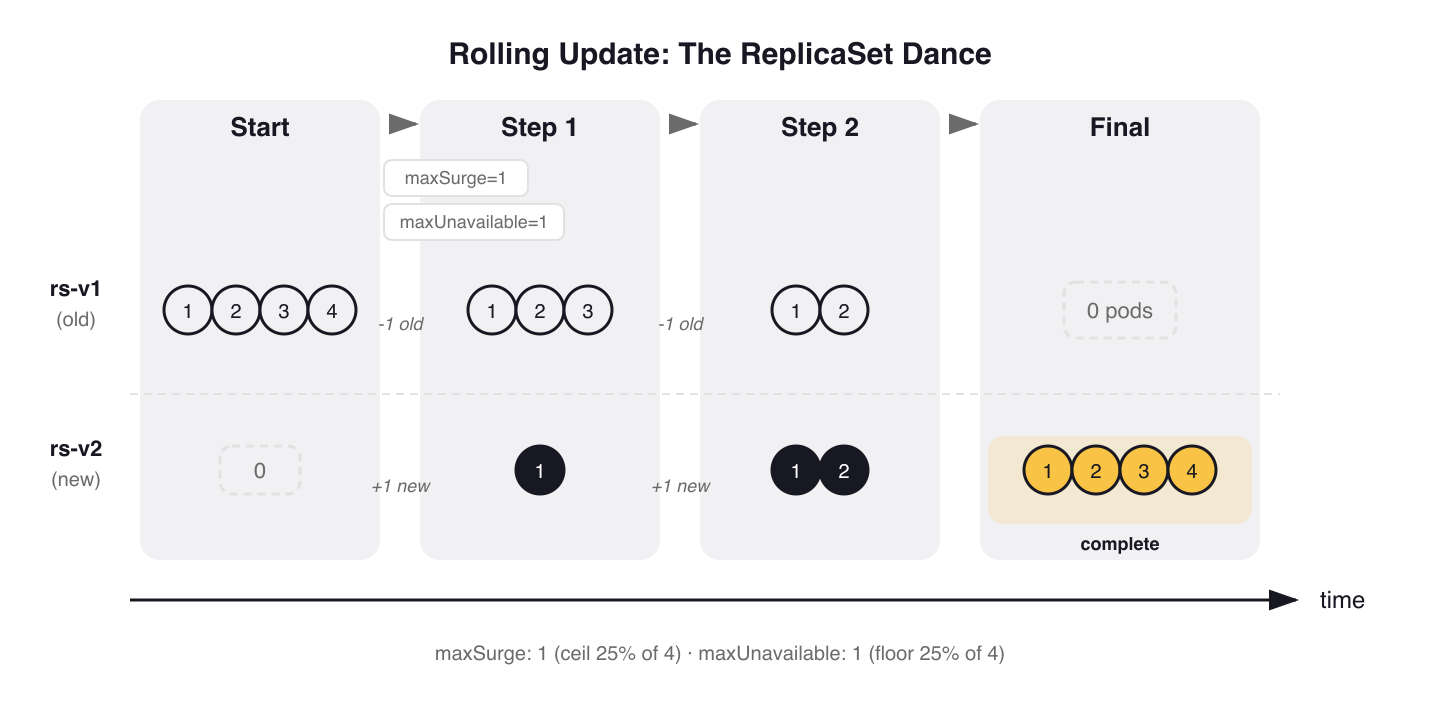 Figure 1: Rolling update ReplicaSet dance. With maxSurge=1 and maxUnavailable=1 (defaults on 4 replicas), Kubernetes transitions pods in steps — the old ReplicaSet scales to zero but is retained for rollback.
RollingUpdate vs. Recreate
Kubernetes supports two strategy types:
RollingUpdate (default): gradually replaces pods, maintaining availability throughout. This is what you'll use for most workloads.
Recreate: kills all existing pods before creating new ones. Zero availability during the switch. Use this when your application cannot tolerate two versions running simultaneously — a database migration that changes the schema, or a workload that holds an exclusive lock on a shared volume.
# Recreate strategy — all pods terminated before new ones start
spec:
  strategy:
    type: Recreate
CoreDNS, the cluster DNS addon, uses RollingUpdate with a conservative configuration to protect DNS availability:
# kubernetes/kubernetes — cluster/addons/dns/coredns/coredns.yaml.base
apiVersion: apps/v1
kind: Deployment
metadata:
  name: coredns
  namespace: kube-system
spec:
  # replicas: not specified here; tuned by DNS horizontal auto-scaling
  strategy:
    type: RollingUpdate
    rollingUpdate:
      maxUnavailable: 1
  # ...
  template:
    # ...
    spec:
      priorityClassName: system-cluster-critical
      affinity:
        podAntiAffinity:
          preferredDuringSchedulingIgnoredDuringExecution:
          - weight: 100
            podAffinityTerm:
              labelSelector:
                matchExpressions:
                  - key: k8s-app
                    operator: In
                    values: ["kube-dns"]
              topologyKey: kubernetes.io/hostname
Three things worth noting: maxUnavailable: 1 guarantees at most one DNS pod goes down at a time. The manifest omits replicas because the DNS autoscaler manages the count externally. And pod anti-affinity spreads replicas across nodes so a single node failure doesn't take out all DNS.
Tuning maxSurge and maxUnavailable
What Each Field Controls
maxSurge sets how many extra pods above the desired count can exist during an update. If your Deployment has 4 replicas and maxSurge: 1, Kubernetes can run up to 5 pods during the transition.
maxUnavailable sets how many pods can be down at the same time. With 4 replicas and maxUnavailable: 1, at least 3 pods are always running.
Both fields accept either an absolute integer or a percentage string. The defaults are 25% for both.
Rounding Behavior
Percentages round differently for each field. maxSurge rounds up (allowing more surge), while maxUnavailable rounds down (allowing fewer unavailable). With 3 replicas and 25% defaults:
maxSurge: ceil(3 × 0.25) = ceil(0.75) = 1 extra pod allowedmaxUnavailable: floor(3 × 0.25) = floor(0.75) = 0 pods can be unavailable
With 3 replicas and defaults, Kubernetes updates one pod at a time with zero downtime. It creates one new pod (surge), waits for it to become ready, then terminates one old pod.
warning:
maxSurgeandmaxUnavailablecannot both be zero. At least one must allow movement, or the rollout has no way to make progress.
Four Patterns from Production
CNCF projects choose different strategies based on their failure characteristics. Here are four patterns, each reflecting a different operational constraint.
Pattern 1: Conservative (ingress-nginx, CoreDNS)
# kubernetes/ingress-nginx — deploy/static/provider/cloud/deploy.yaml
spec:
  minReadySeconds: 0
  revisionHistoryLimit: 10
  # ...
  strategy:
    rollingUpdate:
      maxUnavailable: 1
    type: RollingUpdate
Ingress-nginx uses an absolute maxUnavailable: 1 and lets maxSurge default to 25%. This guarantees exactly one controller pod goes down at a time regardless of how many replicas are running. For an ingress controller, losing multiple pods simultaneously creates traffic blackholes.
Pattern 2: Surge-first (Istio)
Istio's Helm chart defaults to aggressive surge values for istiod:
# istio/istio — manifests/charts/istio-control/istio-discovery/values.yaml
# (under _internal_defaults_do_not_set — Helm-managed defaults for istiod)
_internal_defaults_do_not_set:
  # ...
  rollingMaxSurge: 100%
  rollingMaxUnavailable: 25%
The result: maxSurge: 100% doubles the pod count during an update. All new pods come up before old ones drain. The rationale: when istiod restarts, every sidecar proxy in the mesh reconnects. With 100% surge, the new instances absorb reconnections without a thundering herd.
Pattern 3: No-surge (cert-manager)
# cert-manager/cert-manager — deploy/charts/cert-manager/values.yaml
# Deployment update strategy — ships empty, users configure for their environment.
#
# Recommended for resource-constrained clusters or leader-elected components:
#   strategy:
#     type: RollingUpdate
#     rollingUpdate:
#       maxSurge: 0
#       maxUnavailable: 1
strategy: {}
cert-manager ships with strategy: {} (Kubernetes defaults of 25%/25%) and recommends explicitly configuring maxSurge: 0 with maxUnavailable: 1 for resource-constrained environments. No extra pods are created: one old pod terminates, then one new pod takes its place. Since cert-manager uses leader election and only one controller is active at a time, losing the pod briefly during replacement is acceptable.
Pattern 4: Zero-downtime (metrics-server)
# kubernetes-sigs/metrics-server — manifests/base/deployment.yaml
spec:
  strategy:
    rollingUpdate:
      maxUnavailable: 0
Metrics-server sets maxUnavailable: 0 — the new pod must be ready before the old one is terminated. Combined with the default maxSurge: 25%, this ensures the cluster always has a healthy metrics endpoint available. Without metrics, HPA decisions stall.
Strategy Comparison
| Project | Component | maxSurge | maxUnavailable | Pattern |
|---|---|---|---|---|
| ingress-nginx | Controller | default 25% | 1 |
Conservative |
| Istio | istiod | 100% |
25% |
Surge-first |
| CoreDNS | DNS server | default 25% | 1 |
Conservative |
| metrics-server | Metrics Server | default 25% | 0 |
Zero-downtime |
| cert-manager | All components | 0 (recommended) |
1 (recommended) |
No-surge |
The choice depends on your workload. Infrastructure components that can't tolerate downtime (DNS, ingress, metrics) use conservative or zero-downtime patterns. Components that need to minimize reconnection storms surge aggressively. Resource-constrained environments avoid surge entirely.
The kubectl rollout Toolkit
Checking Rollout Status
kubectl rollout status watches a rollout in real time and exits when it completes or fails:
$ kubectl rollout status deployment/web-app
Waiting for deployment "web-app" rollout to finish: 2 out of 3 new replicas have been updated...
Waiting for deployment "web-app" rollout to finish: 2 of 3 updated replicas are available...
deployment "web-app" successfully rolled out
This is useful in CI/CD pipelines as a gate: it returns exit code 0 on success, non-zero on failure or timeout.
Viewing Rollout History
kubectl rollout history lists all revisions Kubernetes has tracked:
$ kubectl rollout history deployment/web-app
deployment.apps/web-app
REVISION  CHANGE-CAUSE
1         <none>
2         Update nginx to 1.25
3         Update nginx to 1.27
To inspect what changed in a specific revision:
$ kubectl rollout history deployment/web-app --revision=2
deployment.apps/web-app with revision #2
Pod Template:
  Labels:       app=web-app
                pod-template-hash=6b7f6d4bc
  Annotations:  kubernetes.io/change-cause: Update nginx to 1.25
  Containers:
   nginx:
    Image:      nginx:1.25
    Port:       80/TCP
The CHANGE-CAUSE column is populated from the kubernetes.io/change-cause annotation. The old way was the --record flag, deprecated in Kubernetes 1.24. Set it manually instead:
$ kubectl annotate deployment/web-app kubernetes.io/change-cause="Update nginx to 1.27"
Rolling Back
kubectl rollout undo reverts to the previous revision:
$ kubectl rollout undo deployment/web-app
deployment.apps/web-app rolled back
To roll back to a specific revision:
$ kubectl rollout undo deployment/web-app --to-revision=1
deployment.apps/web-app rolled back
Under the hood, a rollback scales up the old ReplicaSet associated with that revision and scales down the current one. The rollback itself becomes a new revision in the history.
Pausing and Resuming
kubectl rollout pause freezes a rollout. This lets you batch multiple changes into a single rollout instead of triggering one per change:
$ kubectl rollout pause deployment/web-app
deployment.apps/web-app paused

$ kubectl set image deployment/web-app nginx=nginx:1.27
$ kubectl set resources deployment/web-app -c nginx --limits=memory=256Mi

$ kubectl rollout resume deployment/web-app
deployment.apps/web-app resumed
Without pausing, each set command would trigger a separate rollout.
Restarting a Rollout
kubectl rollout restart triggers a fresh rollout without changing the spec. It sets a kubectl.kubernetes.io/restartedAt annotation on the pod template, which Kubernetes treats as a template change:
$ kubectl rollout restart deployment/web-app
deployment.apps/web-app restarted
This is useful when you need to cycle all pods after a ConfigMap or Secret change that wasn't automatically picked up, or when you want to pull an updated image with the same tag (not recommended, but common with latest).
Triggering Updates
Three ways to update a Deployment:
# Imperative — update the container image directly
$ kubectl set image deployment/web-app nginx=nginx:1.27

# Interactive — edit the full spec in your editor
$ kubectl edit deployment web-app

# Declarative — apply a modified manifest
$ kubectl apply -f deployment.yaml
For the CKAD exam, kubectl set image is the fastest. In production, kubectl apply with version-controlled manifests is the standard.
Fine-Tuning Rollout Behavior
minReadySeconds
minReadySeconds specifies how long a new pod must stay in Ready state before Kubernetes counts it as "available" and continues the rollout. The default is 0 — the pod is available the instant it passes its readiness probe.
Setting this to 10 or 30 seconds catches pods that start up, pass the initial readiness check, then crash shortly after. Without minReadySeconds, the rollout marks that pod as available and continues terminating old pods, potentially leaving you with a Deployment full of crash-looping replicas.
Most projects ship minReadySeconds: 0 (the default). You set it explicitly in .spec.minReadySeconds when your application has meaningful startup time after the readiness probe first succeeds — a JVM warming up caches, a service downloading configuration, or a component reconnecting to cluster state. Pair it with maxUnavailable: 0 for zero-downtime rollouts: no old pod terminates until the new one has been healthy for minReadySeconds seconds.
progressDeadlineSeconds
progressDeadlineSeconds sets how long Kubernetes waits for a rollout to make progress before reporting it as failed. The default is 600 seconds. When the deadline passes, the Deployment's status includes a Progressing=False condition:
$ kubectl get deployment web-app -o jsonpath='{.status.conditions[?(@.type=="Progressing")].message}'
ReplicaSet "web-app-7c8d9e5fa" has timed out progressing.
warning:
progressDeadlineSecondsdoes NOT trigger an automatic rollback. It marks the rollout as failed, but the old ReplicaSet continues serving traffic. You must runkubectl rollout undoyourself. This surprises people who assume Kubernetes will auto-recover.
revisionHistoryLimit
revisionHistoryLimit controls how many old ReplicaSets are kept for rollback. The default is 10. Each old ReplicaSet consumes an object in etcd, so in clusters with many Deployments, lowering this number reduces etcd storage pressure.
Setting it to 0 disables rollback entirely: all old ReplicaSets are garbage-collected, and kubectl rollout undo has nothing to revert to.
The Single-Replica Deadlock
Cilium's Helm chart contains a real-world lesson about single-replica Deployments. The operator Deployment template overrides maxUnavailable for single replicas:
# cilium/cilium — templates/cilium-operator/deployment.yaml (simplified)
# When replicas == 1, Cilium forces maxUnavailable: 100% to prevent deadlock
strategy:
  rollingUpdate:
    maxUnavailable: 100%
  type: RollingUpdate
The problem: with 1 replica and a percentage-based maxUnavailable (Cilium operator defaults to 50%), Kubernetes rounds down to 0. Combined with podAntiAffinity that prevents two operator pods on the same node, the new pod cannot be scheduled (the old one still occupies the slot), and the old pod cannot be terminated (maxUnavailable is 0). The rollout deadlocks indefinitely.
Cilium solves this by forcing maxUnavailable: 100% for single-replica Deployments. The lesson: always use absolute integers — not percentages — for low replica counts, or explicitly handle the single-replica case.
Gotchas
progressDeadlineSeconds doesn't auto-rollback. The most common misconception. A timed-out rollout stays in its current state. The old ReplicaSet keeps serving, the new one stays partially rolled out, and nothing happens until you run kubectl rollout undo.
Scaling during a rollout distributes pods proportionally. If you scale a Deployment from 3 to 6 replicas while a rollout is in progress, the new pods are split proportionally between the old and new ReplicaSets. You won't get 6 pods on the new version; some will run the old one.
Percentage-based maxUnavailable rounds to 0 with low replica counts. With 1 replica and maxUnavailable: 25%, that's floor(0.25) = 0. The rollout cannot terminate the old pod, causing a deadlock. Use absolute integers for Deployments with fewer than 4 replicas.
The --record flag is deprecated. Removed from kubectl help text in Kubernetes 1.24. Old study materials and blog posts still reference it. Use kubectl annotate with kubernetes.io/change-cause instead.
Only .spec.template changes trigger rollouts. Updating the Deployment's own annotations, labels, or replica count does not create a new ReplicaSet. If an exam task asks you to "trigger a rollout," changing replicas won't do it.
revisionHistoryLimit: 0 erases rollback capability. Once set, all old ReplicaSets are deleted immediately. If you need to roll back afterward, there is nothing to roll back to.
Practice Scenarios
These exercises mirror the format of CKAD exam tasks. Each starts from an existing state, has a constraint, and ends with a verifiable outcome.
A Deployment
api-gatewayin namespaceproductionis runningnginx:1.24with 4 replicas. The platform team requires upgrading tonginx:1.27with zero downtime (maxUnavailable: 0). Update the image, confirm all pods are on the new version, and annotate the revision withchange-cause: security-patch.A Deployment
web-frontendin namespacestagingwas updated this morning and is broken. The on-call engineer needs to roll back to revision 2 — not the previous revision. Identify the correct revision usingkubectl rollout history, then execute a targeted rollback. Verify the image tag matches revision 2.A Deployment
cache-proxycurrently hasmaxSurge: 25%andmaxUnavailable: 25%(defaults). You must reconfigure it to never exceed the desired replica count during updates (setmaxSurge: 0,maxUnavailable: 1). Apply the change and trigger a rollout to verify the new strategy takes effect.During a planned maintenance window, you need to apply three config changes to Deployment
metrics-collectoras a single atomic rollout. Pause the Deployment, apply all three changes, then resume and verify only one new revision appears in the rollout history.
Wrap-up
Rolling updates are a kubectl rollout workflow backed by ReplicaSet versioning. The exam tests all six subcommands; choose your maxSurge and maxUnavailable values based on the specific failure mode you're protecting against, and use absolute integers for any Deployment with fewer than 4 replicas.
Blue/Green and Canary Deployments on Kubernetes covers what comes after rolling updates: implementing traffic-split strategies with native Kubernetes primitives.
Application Deployment (1 of 6)
Languages (Rust, Go & Python), container orchestration (Kubernetes), data and cloud providers (AWS & GCP) lover. Runner & Cyclist.
Subscribe to KubeDojo
Get the latest articles delivered to your inbox.