ConfigMaps

You have a container image that works. Now you need it to behave differently in staging versus production: different log levels, different upstream URLs, different retry thresholds. The naive answers are either baking those values into the image (one image per environment) or hardcoding them as environment variables in your Deployment manifest. The Kubernetes answer is ConfigMaps.
ConfigMaps fall under the "Application Environment, Configuration and Security" domain: 25% of the CKAD exam, the largest single domain. The exam tests all three injection methods plus the imperative commands that create ConfigMaps from literals, files, and env-files. Production relevance goes beyond the exam: every cluster-level tool you'll encounter (CoreDNS, ingress-nginx, Prometheus) uses ConfigMaps for its operational configuration. Understanding how they work, where they break, and when to use which injection method is foundational.
This article covers the three creation patterns, the three injection methods and their trade-offs, hot-reload behavior and its sharp edges, immutability, and the gotchas that catch practitioners off-guard.
Creating ConfigMaps: Imperative First, Declarative When Needed
The exam environment rewards speed. Know the imperative commands cold; you won't have time to look up syntax during a task.
Three creation patterns cover everything you'll encounter:
# kubernetes.io/docs/tasks/configure-pod-container/configure-pod-configmap/

# From literals — fastest for simple scalar values
kubectl create configmap app-config \
  --from-literal=LOG_LEVEL=info \
  --from-literal=MAX_RETRIES=3

# From a file — key defaults to filename, value is file content
kubectl create configmap nginx-conf --from-file=nginx.conf

# From a file with a custom key name
kubectl create configmap nginx-conf --from-file=server.conf=./configs/nginx-prod.conf

# From a directory — all files in the dir become keys
kubectl create configmap game-config --from-file=./config-dir/

# From an env-file — parses KEY=VAL lines, one key per line
# Comments (#) and blank lines are stripped; no shell quoting
kubectl create configmap env-config --from-env-file=./app.env

# Generate a declarative YAML skeleton from an imperative command
kubectl create configmap app-config \
  --from-literal=LOG_LEVEL=info \
  --dry-run=client -o yaml
The key difference from --from-file: --from-file creates one key whose value is the entire file contents. --from-env-file creates one key per line, useful for batch-importing a .env file.
For declarative YAML, the structure is straightforward. The data field holds UTF-8 string values; binaryData holds base64-encoded bytes for non-text content. Multi-line values use YAML block scalars:
# configmap-app.yaml
apiVersion: v1
kind: ConfigMap
metadata:
  name: app-config
  namespace: default
data:
  LOG_LEVEL: info
  MAX_RETRIES: "3"
  app.properties: |
    server.port=8080
    server.timeout=30s
    feature.beta=false
note: The 1 MiB size limit on ConfigMaps is a hard API server constraint, not a suggestion. A ConfigMap holding a 2 MiB Nginx config will be rejected. If you're stuffing large scripts, certificate chains, or SQL migration files into a ConfigMap, you need a different approach: init containers, external secret stores, or mounting files from a volume backed by something other than etcd.
Injecting Configuration: Three Methods, Three Trade-offs
The CKAD tests all three injection methods. Production systems add nuance: the right choice depends on how your app reads config and whether you need live updates.
Method 1: env with configMapKeyRef
Single key, single env var, explicit mapping. You control both the ConfigMap key and the env var name:
# pod-env-keyref.yaml
spec:
  containers:
  - name: app
    image: myapp:1.0
    env:
    - name: LOG_LEVEL          # env var name in the container
      valueFrom:
        configMapKeyRef:
          name: app-config     # ConfigMap name
          key: LOG_LEVEL       # key within the ConfigMap
    - name: MAX_RETRIES
      valueFrom:
        configMapKeyRef:
          name: app-config
          key: MAX_RETRIES
          optional: true       # Pod starts even if key is missing
Use this when your app reads specific named env vars and you want fine-grained control. You can rename keys (configMapKey: proxy-connect-timeout → env var PROXY_TIMEOUT). The limitation: every key must be listed individually. For a ConfigMap with 20 keys, this becomes tedious.
Method 2: envFrom with configMapRef
Entire ConfigMap lands in the container as env vars. Keys become variable names:
# pod-envfrom.yaml
spec:
  containers:
  - name: app
    image: myapp:1.0
    envFrom:
    - configMapRef:
        name: app-config
This is the 12-factor approach: all configuration comes from the environment. The problem is key naming. Environment variable names must consist of alphanumeric characters and underscores only: no dashes, no dots. Keys with dashes or dots (proxy-connect-timeout, app.port) are silently skipped. Kubernetes logs an InvalidEnvironmentVariableNames warning event, but the Pod starts regardless, and the missing variable is invisible until runtime.
The ingress-nginx custom-configuration ConfigMap illustrates the risk:
# github.com/kubernetes/ingress-nginx — docs/examples/customization/custom-configuration/configmap.yaml
apiVersion: v1
kind: ConfigMap
metadata:
  name: ingress-nginx-controller
  namespace: ingress-nginx
  labels:
    app.kubernetes.io/name: ingress-nginx
    app.kubernetes.io/part-of: ingress-nginx
data:
  proxy-connect-timeout: "10"
  proxy-read-timeout: "120"
  proxy-send-timeout: "120"
If you tried to mount this with envFrom, all three keys would be silently skipped. Dashes are not valid in env var names. ingress-nginx avoids this problem entirely: the controller watches the ConfigMap directly via the Kubernetes API and reads the keys using its own internal mapping. It never uses envFrom.
Method 3: Volume mounts
ConfigMap keys become files at the mounted path. This is the right choice for apps that read configuration from disk: Nginx configs, Corefiles, redis.conf, anything that isn't a simple scalar.
The simplest form mounts the entire ConfigMap — every key becomes a file named after the key:
# github.com/kubernetes/website — content/en/examples/pods/pod-configmap-volume.yaml
apiVersion: v1
kind: Pod
metadata:
  name: dapi-test-pod
spec:
  containers:
  - name: test-container
    image: registry.k8s.io/busybox:1.27.2
    command: [ "/bin/sh", "-c", "ls /etc/config/" ]
    volumeMounts:
    - name: config-volume
      mountPath: /etc/config
  volumes:
  - name: config-volume
    configMap:
      name: special-config
  restartPolicy: Never
For selective projection (mapping specific keys to specific filenames), use items[]. This is the pattern CoreDNS uses to place its Corefile key at exactly /etc/coredns/Corefile:
# github.com/coredns/deployment — kubernetes/coredns.yaml.sed (volumes section)
volumes:
  - name: config-volume
    configMap:
      name: coredns
      items:
      - key: Corefile
        path: Corefile
# github.com/coredns/deployment — kubernetes/coredns.yaml.sed (volumeMounts section)
volumeMounts:
- name: config-volume
  mountPath: /etc/coredns
  readOnly: true
The items[].path: Corefile combined with mountPath: /etc/coredns places the key at /etc/coredns/Corefile. The corresponding ConfigMap stores the entire DNS configuration in a single multi-line key:
# github.com/coredns/deployment — kubernetes/coredns.yaml.sed (ConfigMap)
apiVersion: v1
kind: ConfigMap
metadata:
  name: coredns
  namespace: kube-system
data:
  Corefile: |
    .:53 {
        errors
        health {
          lameduck 5s
        }
        ready
        kubernetes CLUSTER_DOMAIN REVERSE_CIDRS {
          fallthrough in-addr.arpa ip6.arpa
        }
        prometheus :9153
        forward . UPSTREAMNAMESERVER {
          max_concurrent 1000
        }
        cache 30
        loop
        reload
        loadbalance
    }STUBDOMAINS
The CoreDNS container receives -conf /etc/coredns/Corefile as its startup argument and reads that file at runtime. The reload plugin in the Corefile tells CoreDNS to watch the file and reload its config when it changes, which matters for the hot-reload discussion coming next.
Injection method decision matrix
| Method | Field | Auto-update | Scope | Naming constraint |
|---|---|---|---|---|
env + configMapKeyRef |
Per-key env var | No (pod restart required) | Single key per entry | Key must be a valid env var name |
envFrom + configMapRef |
All keys as env vars | No (pod restart required) | Entire ConfigMap | Keys must be valid env var names; invalid keys are silently skipped |
| Volume mount (full) | All keys as files | Yes, up to ~2 min lag | Entire ConfigMap | No constraint |
Volume mount (items[]) |
Selected keys as files | Yes, up to ~2 min lag | Specific keys | No constraint |
Volume mount (subPath) |
Single key as a file | No (same as env vars) | Single key | No constraint |
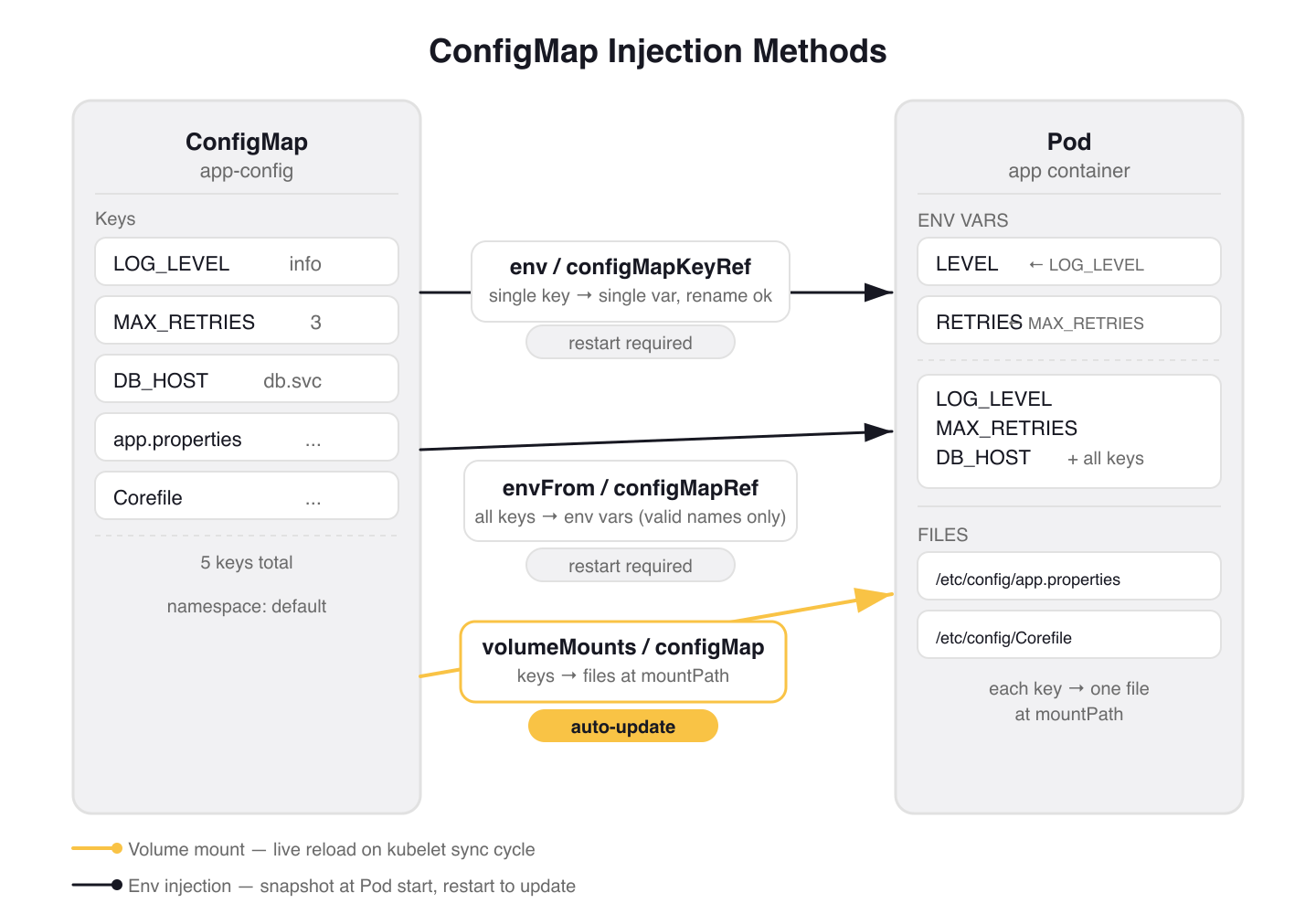 Figure 1: The three ConfigMap injection methods. Volume mounts (gold) support live reload; env-based methods snapshot at Pod start and require a restart to pick up changes.
Hot-Reload: What Updates Automatically and What Doesn't
This is the behavior difference that matters most in production, and it's exactly what the CKAD tests.
Volume-mounted ConfigMaps update automatically when the ConfigMap changes. The kubelet polls on its sync period (default: 1 minute) and uses a TTL-based cache for watch propagation. Total latency from ConfigMap edit to file update in the container: up to about 2 minutes. The Kubernetes docs tutorial demonstrates this concretely: edit the sport ConfigMap, watch the logs, and after the kubelet syncs, the container starts reading the new value:
# From the Kubernetes docs hot-reload tutorial
$ kubectl logs deployments/configmap-volume --follow
Thu Jan  4 14:11:56 UTC 2024 My preferred sport is football
Thu Jan  4 14:12:06 UTC 2024 My preferred sport is cricket  # update propagated
Thu Jan  4 14:12:16 UTC 2024 My preferred sport is cricket
Environment variables do not update. They are set when the container starts and frozen there. Editing the ConfigMap has zero effect until the Pod is replaced. The same Kubernetes tutorial shows this failure mode for envFrom:
# env var version — ConfigMap was edited, but output does not change
$ kubectl logs deployments/configmap-env-var --follow
Thu Jan  4 16:12:56 UTC 2024 The basket is full of apples
Thu Jan  4 16:13:16 UTC 2024 The basket is full of apples  # no change despite ConfigMap edit
Two exceptions to the "volumes update, env vars don't" rule:
subPathmounts do not update. A volume mount usingsubPathinjects a single key into a specific path within an existing directory. This avoids overwriting the directory's other contents, but it loses the hot-reload property. It behaves like an env var: frozen at container start.App cooperation required. Even with volume hot-reload, the app must actually re-read the file. Apps that parse config once at startup and cache it internally won't see updates without a process restart. CoreDNS handles this with its
reloadplugin, which polls the Corefile on a timer and re-applies the config when it changes. Most applications are not this thoughtful.
warning: If you mount a ConfigMap volume at a path like
/etc/nginxand that directory already has files in the container image, the volume mount replaces the entire directory. Only the ConfigMap keys are visible at that path. Existing image files at that path are gone.
Production pattern: Stakater Reloader. When you need env var-style semantics (app reads config at startup) but want automatic rollouts on ConfigMap changes, Stakater Reloader is the standard solution. Add an annotation to your Deployment:
# Deployment metadata section
metadata:
  annotations:
    configmap.reloader.stakater.com/reload: "app-config"
Reloader watches the named ConfigMap, computes a SHA1 hash of its data, and when the hash changes, updates a synthetic env var in the Deployment template. This triggers a rolling restart that picks up the new ConfigMap values during the new Pod's startup. With maxUnavailable: 0, there's no downtime. This is the production pattern for applications that read config at startup and can't be hot-reloaded.
Immutable ConfigMaps
The immutable: true field (stable since Kubernetes 1.21) prevents data mutation and disables the kubelet's watch for that ConfigMap. In large clusters with tens of thousands of ConfigMap-to-Pod mounts, this reduces API server load significantly: the kubelet stops polling for changes it knows won't happen.
# configmap-company-name.yaml
apiVersion: v1
kind: ConfigMap
metadata:
  name: company-name-20150801
immutable: true
data:
  company_name: "ACME, Inc."
The trade-off: immutability cannot be reverted. You cannot change immutable: true back to false, and you cannot modify data or binaryData on an immutable ConfigMap. The only option is delete and recreate — which means Pods holding a mount point to the deleted ConfigMap need to be replaced too.
The workflow for updating immutable ConfigMaps is to version by name:
# Create the new version
kubectl apply -f company-name-20240312.yaml  # company_name: "Fiktivesunternehmen GmbH"

# Update the Deployment to reference the new ConfigMap
kubectl edit deployment immutable-configmap-volume
# Change: name: company-name-20150801 → name: company-name-20240312

# Rolling restart picks up the new ConfigMap
kubectl rollout status deployment/immutable-configmap-volume

# Delete the old ConfigMap after the rollout completes
kubectl delete configmap company-name-20150801
This pattern (company-name-20150801, company-name-20240312) also appears in the official Kubernetes docs tutorial. It makes the "which version is deployed" question answerable by inspection and eliminates the class of incidents where an operator edits a live ConfigMap and silently breaks a running system.
Use immutable ConfigMaps for configuration that is genuinely static: TLS CA bundles, compiled-in feature flag snapshots, base image lists. Don't use them for anything that changes with deployments unless you're committed to the versioned-name workflow.
Gotchas
Keys with dashes break envFrom silently. proxy-connect-timeout is not a valid env var name. Kubernetes skips it and logs an InvalidEnvironmentVariableNames warning event, but the Pod starts. The bug is invisible at startup. Use env + configMapKeyRef and rename the variable (name: PROXY_CONNECT_TIMEOUT) if you need these keys as env vars.
envFrom collision is last-writer-wins. If two ConfigMaps mounted via envFrom define the same key, the last one in the list wins. No error, no warning. Use env + configMapKeyRef when you need explicit precedence control.
ConfigMap must exist before the Pod starts (unless optional: true). A missing ConfigMap reference that isn't marked optional will hold the Pod in ContainerCreating indefinitely. Add optional: true to both configMapKeyRef and configMapRef references for configuration that may not exist at pod start time.
env:
- name: OPTIONAL_FLAG
  valueFrom:
    configMapKeyRef:
      name: feature-flags
      key: beta-feature
      optional: true  # Pod starts even if configmap or key is absent
envFrom:
- configMapRef:
    name: feature-flags
    optional: true  # Pod starts even if the ConfigMap does not exist
subPath loses hot-reload. Engineers reach for subPath specifically to avoid clobbering an existing directory, then expect live updates because "it's a volume mount." It doesn't update. Mount the full ConfigMap at a dedicated path instead, or accept that you need a restart on change.
Namespace boundary. A Pod can only reference ConfigMaps in its own namespace. This trips up engineers who copy Deployments between namespaces without copying the referenced ConfigMaps.
Static Pods cannot use ConfigMaps. The kubelet manages static Pods directly without the API server. ConfigMap references in static Pod specs are ignored. This is relevant if you're configuring control plane components on the node.
Wrap-up
ConfigMaps have three creation patterns (--from-literal, --from-file, --from-env-file) and three injection methods: per-key env vars, bulk envFrom, and volume mounts. The one behavior difference that bites practitioners most in production: volume-mounted ConfigMaps update automatically (with up to ~2 minutes of lag); env vars do not.
For production systems, the choice between injection methods usually comes down to two questions: does the app read config files from disk, or env vars? And does it need live updates, or is a rolling restart on change acceptable? Volume mounts answer the first; Stakater Reloader handles the second. Immutable ConfigMaps add a third axis: for truly static configuration, baking the version into the name eliminates a whole class of silent mutation bugs.
Next: Secrets — same injection mechanics, different threat model. The key questions are when Secrets are actually secret (less often than you'd expect) and what you need to add on top of them to make sensitive data genuinely protected in a multi-tenant cluster.
Application Environment, Configuration and Security (1 of 13)
Languages (Rust, Go & Python), container orchestration (Kubernetes), data and cloud providers (AWS & GCP) lover. Runner & Cyclist.
Subscribe to KubeDojo
Get the latest articles delivered to your inbox.